OPC Group Management
An OPC group is used to represent a set of points that have a common polling/update frequency, are related by functionality, or are commonly viewed together. In CygNet, options are available to manage OPC groups, thus improving resource allocation issues and server limitations. When an OPC group is created and items are added to it, a user can make a change to the entire group rather than changing each item in it. Data item values that the OPC Server retrieves from an RTU are sent in one transmission to the OPC Group created by CygNet, rather than individually.
CygNet provides options for a user to create OPC groups configured for an OPC comm device, remote device, or data group.
For more information about managing OPC groups, see the following subsections:
- Configuring OPC Groups for the Comm Device
- Configuring OPC Groups for the Remote Device
- Assigning a Data Group to an OPC Group
Configuring OPC Groups for the Comm Device
The OPC Comm Device Editor includes an OPC Group Definition section where a user can designate a default OPC group that multiple remote devices can share.
Note: If an OPC comm device is disabled, all groups managed by that device are removed from the OPC server.
The following image shows the OPC Group Definition section of the OPC Comm Device Editor:
|
OPC Comm Device Group Definition |
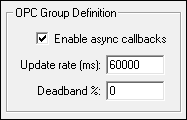
OPC Group Definition
The following table lists and describes properties for the OPC Group Definition section of the OPC Comm Device Editor.
| Property | Description |
|---|---|
|
Enable async callbacks |
When Enable asynchronous callbacks is selected, the OPC server will perform asynchronous callbacks and push data to the OPC EIE as it retrieves changed values from the remote device. |
|
Update rate (ms) |
The value selected for the Update rate (ms) for asynchronous callbacks determines the following behavior:
The default value is 60000 milliseconds. |
|
Deadband % |
The Deadband % is an OPC standard capability that requests that an OPC server only report value changes that exceed a configured percentage. Type a percentage value for the OPC Group Definition. The default value is 0. |
Configuring OPC Groups for the Remote Device
The Device page of the OPC EIE remote device includes an OPC Group Definition section where a user can designate a default OPC group that multiple data groups associated with that device can share.
Note: If a remote device is disabled, its items (and possibly groups) defined on the OPC server are removed.
The following image shows the OPC Group Definition section of the Device page of the OPC EIE:
|
OPC EIE Group Definition |
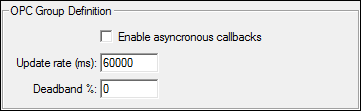
OPC Group Definition
The following table lists and describes properties for the OPC Group Definition section of the Device page of the OPC EIE.
| Property | Description |
|---|---|
|
Enable asynchronous callbacks |
When selected, the OPC server will push data to the OPC EIE as it obtains changed values from the remote device. |
|
Update rate (ms) |
The value selected for the Update rate (ms) for asynchronous callbacks determines the following behavior:
The default value is 60000 milliseconds. |
|
Deadband% |
The OPC Group deadband in percent. Default is 0. |
Assigning a Data Group to an OPC Group
The OPC Group section of a Data Group Properties page allows a user to assign a data group to an OPC group definition. The most popular OPC servers use significant server resources for each OPC group. Because of this, it is recommended that you use one of the following OPC group definitions when assigning a data group to an OPC group. Data groups with the same properties are automatically placed in one OPC group, which conserves OPC server resources.
- Associated with comm device
- Associated with remote device
- With matching properties
It is recommended that you match data groups with like properties as much as possible so that they are combined in a shared OPC group. For example, Associated with comm device would define the most common properties used and should be used as often as possible to better manage OPC server resources.
Using the None (temporary) OPC group definition is useful if you have data groups that do not fit with other group settings, the data group has dynamic item IDs based on user input, or the server has limited resources and performance is not a concern for that data group.
For more information, see OPC Data Groups.
Note: The "Single Item" data group only uses the None (temporary) OPC group. OPC Group Definition assignment is not available for "Single Item" data groups.
The following image shows an example OPC Group section of a Data Group Properties page with the data group assigned to the OPC Comm EIE:
|
OPC Group Options |
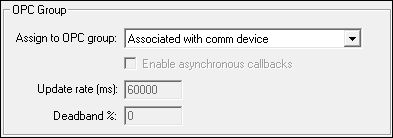
OPC Group
The following table lists and describes properties for the OPC Group section of the Data Group Properties page.
| Property | Description |
|---|---|
|
Assign to OPC group |
This option allows a user to pair a data group with an OPC group definition:
|
|
Enable asynchronous callbacks |
When Enable asynchronous callbacks is selected, the OPC server will perform asynchronous callbacks and push data to the OPC EIE as it retrieves changed values from the remote device. This option is only available with the following selections from Assign to OPC group:
|
|
Update rate (ms) |
The value selected for the Update rate (ms) for asynchronous callbacks determines the following behavior:
The default value is 60000 milliseconds. |
|
Deadband % |
The Deadband % is an OPC standard capability that requests that an OPC server only report value changes that exceed a configured percentage. Type a percentage value for the OPC Group Definition. The default value is 0. |


